C4CT


C4CT is for Control4 authorized customers only.
To learn more about becoming Control4 authorized, click here.

Specialized Training for Control4 Integrators 

We offer two paths to Control4 certification, C4CT Online, is done virtually and is self paced, and C4CT Live, is a 5-day instructor-led class offered at ADI training centers. Both courses use the same equipment to provide a hands-on learning experience.

Log In to Enroll Now
C4CT logo

New C4CT In-Class Training Format

Training is essential for developing expert technicians, but throwing an inexperienced integrator into a customer's home or business to earn that expertise the hard way can lead to a negative customer experience. That's why C4CT offers hands-on learning with the same equipment technicians use in the field. Real-life training scenarios provide the opportunity to practice and learn from mistakes without the risk of repeating them on the job.

C4CT prepares technicians to create world-class Control4 automation systems by getting hands-on experience integrating a variety of devices from the standard categories below.  

Security & Surveillance

Security icon

Practice installing and configuring the most common security and surveillance devices such as cameras, video doorbells, and contacts. In addition, learn to set up the latest AI-powered surveillance features. Then, integrate these devices with Control4.

Climate Control

Climate Icon

Create a comfortable and energy-efficient environment by installing and integrating a smart thermostat. In addition, make a “dumb” device smarter, such as a run-of-the-mill electric fireplace, by integrating it using a relay.

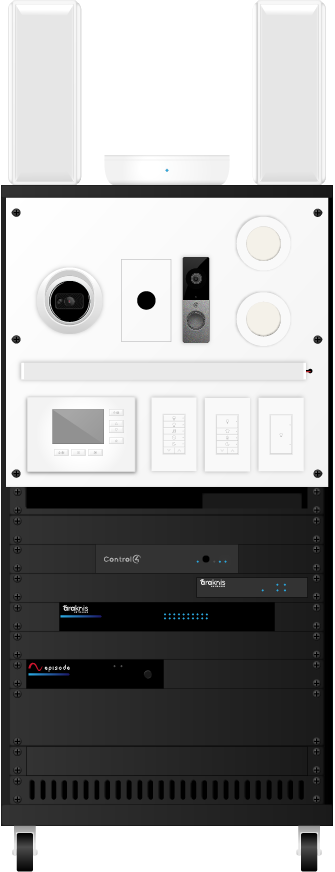
Rack graphic

Video & Audio

Video and Audio icon

Gain video and audio experience by setting up and configuring smart TVs, amplifiers, and speakers. Learn to integrate video and add multi-room audio to create a whole-home entertainment experience.

Lighting

Lighting icon

Integrate a variety of lighting fixtures, switches, dimmers, and keypads — including Control4 Vibrant linear lighting. Learn to use lighting scenes to set a specific ambiance or mood. Configure dimmer properties to precisely control the dimming behavior of any fixture.

Araknis Networks® Wi-Fi 6 520 Series Indoor Wireless Access Point

Surface Mount Alarm Magnetic Contact

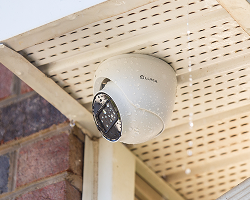
Luma Surveillance™ 220 Series 2MP Turret IP Outdoor Camera

Control4® Vibrant Performance Fixed Color Linear Light 3000K (with Extrusion & Lens)

Control4® Wireless Thermostat by Aprilaire® 8644C4

Control4® Vibrant 30 Watt 24V Power Supply

Control4® T4 Series Tabletop Touchscreen

Araknis Networks® 220-Series Single-WAN Multi-Gigabit VPN Router

Episode® Response DSP Amplifier | 200W x 2 Channels

Rack graphic

Episode® 300 Series SAT Speaker with 3" Woofer

Strong™ Contractor Series Rack 21U (with 1U shelf, 2-1U blank panels, 1U vented panel, and 2U blank panel)

Commercial Electric Ultra Slim Integrated LED Recessed Light (x2)

Control4® Chime Video Doorbell, PoE

Control4® Switch, Contemporary Control4® Keypad Dimmer, Contemporary (x2) (with faceplates and engraved keycaps)

Control4® CORE 3 Controller

Araknis Networks® 220 Series L2 Managed Gigabit Switch with Partial PoE+

WattBox® 800 Series IP Surge Protector

Master Residential and Commercial Installs

This curriculum includes learning the differences between residential and commercial projects, from project scope and organization to the little nuances, like naming devices and rooms.

Graphic element

Controller Registration to Customer Handoff—and Everything In Between

Graphic element

Your First Control4 Project Dive in headfirst and set up real equipment and configure it to create a fully-functioning, one-room Control4 automation project.

Graphic element

Video and Audio
Add on to your install from Course 1 and go deeper into video and add multi-room audio to create a whole-home entertainment experience.

Graphic element

Climate Control
Create a comfortable environment by installing and integrating a smart thermostat.

Lighting Icon

Lighting and More Immerse yourself in all things lighting by installing and integrating a variety of lighting fixtures, switches, dimmers, and keypads.

Graphic element

Zigbee Network Principles and Room End-Points
Learn to implement rock-solid Zigbee mesh networks. Then learn the keys to evaluating and making Room End-Point Connections for progressively more complex scenarios.

Graphic element

Security and Surveillance Install, configure, and integrate the most common security and surveillance devices, such as cameras, video doorbells, and contacts.

Graphic element

Programming
Practice proven techniques and methods to take automation to the next level through custom programming — including programming video and audio and leveraging agents like Scheduler, Navigation, Macros, Custom Buttons, and more.

Graphic element

Putting It All Together Apply all the knowledge and skills from the previous seven courses to create a complete automation project — from registering and setting up the controller all the way to handing it over to the customer.

How It Works

Graphic element

Cost

We offer several purchasing options:
C4CT Equipment Option ($3,700 USD) — which includes equipment, access to the online curriculum, and one certification exam attempt.
C4CT Shared Option ($100 USD) — After the purchase of at least one full kit, which allows additional technicians to share equipment from the Full Kit, access to online curriculum, and one certification exam attempt each.
C4CT Live ($0 USD) — includes a seat at one of the ADI global training centers, access to already configured equipment, a workbook, and a certification exam attempt. The attendee is responsible for individual travel and hotel accommodations.

Getting Started

C4CT Online: Any equipment purchased will be shipped out to you shortly. You'll receive an email confirming your order, and any technicians added to the program will be notified. As soon as the equipment arrives, technicians access the curriculum through the “My Courses” page for your region.

C4CT Live: There is no prerequisite course for C4CT Live. Enroll and register for one of the in-person 5-day classes on our Live Learning page.

Courses

C4CT Online: On average, it takes approximately 50 hours to complete all eight courses, including the hands-on practice labs. Technicians work through the eight courses using the equipment to complete the hands-on learning activities and practice labs. Courses also include resources like an online workbook and the opportunity to schedule video conference “office hours” with one of our instructors. The courses are designed to be flexible enough to accommodate a technician's busy schedule and can be completed between jobs.

C4CT Live: This course takes 5 days to complete. 4 days of instruction and the final day for the exam. The technician completes the course work and exam with an already assembled rack of equipment that is installed and configured.

Certification Exam

Online Option: C4CT Online: After completing all the courses and practice labs, the technician can schedule their certification exam. The exam is administered online using the proctoring service ProctorU. The exam has two parts: a multiple-choice question section and a practical section. For the practical section, the technician must successfully create an automation project using their equipment based on a scenario provided at the time of the exam. If a technician fails the exam, they are welcome to re-take it; however, each exam attempt after the first one incurs a nominal fee.

C4CT Live: After completing the course work and practice labs, an exam will be administered by the on site technician instructor. Like C4CT Online, the exam is split into two parts: a multiple-choice section and a practical section where the technician creates an automation project based on a scenario provided.

If a technician fails to achieve an 85% to certify, there is not an option to immediately retake the in-person exam. The technician can attend another C4CT Live class or purchase C4CT Online.

After completing the certification, a technician's certification can be printed off their "My Certifications" page.

Graphic element

C4CT Online vs. C4CT Live

You may be asking yourself, "What's the difference between C4CT Online and C4CT Live training?" Both offer exceptional training opportunities, but there are some differences to consider when selecting the ideal program for you.

The C4CT Live class allows a technician to attend a 5-day instructor-led class at one of the ADI global education centers. This 5-day course is fast-paced and focuses heavily on the programming aspect of Control4.

C4CT Online offers the ability to go at the technician's own pace and takes them through not only the programming, but also the installation and configuration of equipment.

Graphic element

C4CT Live

C4CT Online

Instructor-led, facilitated at an ADI Education Center

Self-paced, facilitated online

Access to live instructors for help, when needed.

Hands-on learning with real equipment

Setting up a basic network, including Wi-Fi

Learning and applying rack-building principles

Hands-on practice with actual device installation and setup

Hands-on practice applying best practices for wire management

Online chat support

Access to learning materials such as workbooks, troubleshooting guides, etc.

Includes both Residential and Commercial hands-on practice scenarios

FAQs

All technicians that have been Automation Programmer certified before C4CT is launched will be grandfathered in as C4CT certified. Digital badges and certificates will be updated to reflect this change on all portals. If you do not have an updated badge or certificate, or have any other concerns regarding your certification, please contact us via email at [email protected].

No prerequisites are required for enrolling in either the C4CT Online or C4CT Live certification program.

We will make periodic updates to C4CT course content and devices. Due to ongoing device and operating system updates, C4CT Online equipment kits will not last forever and will eventually need to be replaced. We will communicate changes at least 6 months in advance to ensure enough time is given to complete the courses and final exam before an updated equipment kit is required.

Once a technician has certified, a digital badge will display on their My Certifications page and a certificate can be downloaded.

C4CT Online: It takes an average of 50 hours of “seat time” to complete C4CT Online. Completion time will vary based upon each technician's learning preferences and prior experience. The courses are designed to offer flexibility to accommodate other work priorities—a technician can exit a course at any time and come back to it later right where they left off. However, because course concepts build on each other, we recommend that technicians stay as focused as possible on completing C4CT.

C4CT Live: The Live course takes 5 days to complete, including 4.5 days of instruction and 0.5 day for the final exam.

C4CT Online: Like the courses themselves, the exam is also completed online. It is proctored through an online service called ProctorU. The exam consists of two sections: a multiple-choice question section and a practical section. The technician uses their C4CT equipment to complete the practical section. Technicians have a total of four hours to complete the exam.

C4CT Live: Technicians take the same online exam as those that take C4CT Online, but instead of a proctoring service, an instructor will administer and proctor the exam. The exam consists of two sections: a multiple-choice question section and a practical section. The technician uses their C4CT equipment to complete the practical section. Technicians have a total of four hours to complete the exam.

C4CT Online: The certification exam can be retaken when a technician does not achieve a passing score. The first certification exam attempt is included with each technician's C4CT registration. Additional exam attempts incur a nominal fee at the learner's expense. After each attempt, the technician will receive detailed feedback about the practical portion of the exam. If a technician does not achieve a passing score, we recommend they review this feedback and the related course sections before attempting the exam again.

C4CT Live: A technician only has one attempt at the final exam while attending C4CT Live. If a technician fails the final exam, they can attend another C4CT Live session, order a C4CT Online full kit, or share a kit with another technician within their company.

C4CT Online: We offer two purchasing options:

  • C4CT Online: Full Kit—This option includes all necessary equipment, access to the online curriculum, and one certification exam attempt. The cost for the Full Kit is $3,700 USD.
  • C4CT Online: Shared Kit—After the purchase of at least one Full Kit, a Shared Kit can be purchased for each additional technician. A Shared Kit allows additional technicians to share the Full Kit, access to online curriculum, and one certification exam attempt each. The cost for the Shared Kit is $100 USD.
  • C4CT Live: There is zero ($0 USD) cost for registration for C4CT Live. All travel and accommodation are at the expense of the technician.

Online chat and the ability to schedule a 30-minute video chat with a technical instructor will be available for technicians as they go through the course and certification process. Visit the C4CT Help page in the Tech Community for more information.

C4CT Online: Each technician will need a computer that is able to connect to a network using an Ethernet cable—either directly to an Ethernet port or to an external dongle. The computer must also be capable of running Microsoft Windows 11 or later. A webcam and microphone are required for the online proctored certification exam. While not required, a mouse, headphones, and a second display or tablet can be helpful when working through the courses.

C4CT Live: Each technician will need a computer that is able to connect to a network using an Ethernet cable—either directly to an Ethernet port or to an external dongle. The computer must also be capable of running Microsoft Windows 11 or later.

Technicians will need enough space to accommodate unpacking the equipment boxes and building the equipment rack. The only requirements for the space where technicians complete C4CT Online are:

  • Desk space for the technician's computer, a TV, touchscreen, and Halo remote
  • Floor space next to the desk for the equipment rack
  • Internet access via an Ethernet port—either a jack on the wall, a network switch, or a modem/router from an Internet provider
  • Power

Once registered, technicians access their C4CT Online courses on the My Courses page of the Snap One Partner portal or Control4 Dealer portal, depending on their region. For the best experience, the recommended browsers are Google Chrome, Mozilla Firefox, or Microsoft Edge.

Each course includes detailed troubleshooting information. In addition, technicians can find documentation for solutions to common issues, chat online with one of our instructors, or even schedule a video conference call on the C4CT page in the Tech Community.

Yes. However, only one technician at a time can use the equipment to complete C4CT Online courses and the certification exam. When sharing equipment, it must be completely reset before the next technician can start C4CT.

Once the Full Kit ships, technicians will be enrolled and can access their C4CT courses on the “My Courses” page. As soon as the physical equipment arrives, technicians can begin C4CT. For the best experience, the recommended browsers are Google Chrome, Mozilla Firefox, or Microsoft Edge.

Periodic updates to operating systems, drivers, agents, hardware, and software require the C4CT Online equipment kits to be updated. You will be notified 6 months in advance of any changes to the C4CT online equipment kit version. This will allow for time for any in-progress technician to complete the courses and final exam before an updated version of the equipment kit is required.

No. C4CT Online is designed specifically for the devices that are included. The C4CT Online: Full Kit option includes everything you need to be able to successfully complete the courses and final exam.We are unable to provide support for any devices not provided with the purchase. Also, the final exam is automatically graded, using a similar but not specific device may result in marking a section incorrect resulting in a lower score.
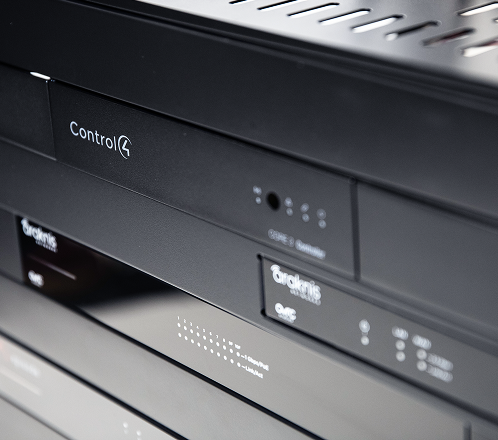
After your technicians are certified, how you use the equipment is up to you. We recommend using the C4CT Online equipment kit as an educational resource to provide continued practice for you and your technicians. If sold, no warranty is attached to the individual devices.